


Auralis™ UltraCleanse
Auralis™ UltraCleanse
Safer, Simpler Ear Cleaning
[User Manual Included In Box With Product]


 See clearly with HD camera
Soft Silicone Tips for Gentle Cleaning
Helps Avoid Pushing Wax Deeper
Connects Easily to Your Phone
-

Being able to see inside my ear makes cleaning feel much safer and easier
-

The camera is clear, and the soft tips feel very gentle while cleaning
-

Feels solid and well made, not cheap like I expected at first.


In stock
Couldn't load pickup availability
-
Ordered
-
Order Ready
- - -
Delivered

Auralis™ UltraCleanse
Can this damage my ear?
Can this damage my ear?
When used properly (outer ear only and without deep insertion), it is safe. Always move slowly and stop if you feel any discomfort.
How does the camera work?
How does the camera work?
The built-in HD camera streams a live video feed to your smartphone via the EarVision app, allowing you to see exactly what you’re doing.
Shipping & Delivery
Shipping & Delivery
Orders ship within 1 business day from our U.S. warehouse. Once shipped, you'll receive a tracking number via email within 24 hours. Most U.S. orders are delivered within 2-3 business days.
Return & Refund Policy
Return & Refund Policy
Just send us a short video as proof, and we'll refund you right away.
We offer a 60-days, 100% Money-Back Guarantee. If you're not fully satisfied, we'll refund your entire purchase, including shipping.
To start a return, simply email us at mycomfort.us@gmail.com


No Guesswork
Gentle Cleaning
HD Video
No Guesswork
Gentle Cleaning
HD Video
No Guesswork
Gentle Cleaning
HD Video
No Guesswork
Gentle Cleaning
HD Video
No Guesswork
Gentle Cleaning
HD Video
No Guesswork
Gentle Cleaning
HD Video
No Guesswork
Gentle Cleaning
HD Video
No Guesswork
Gentle Cleaning
HD Video
No Guesswork
Gentle Cleaning
HD Video
No Guesswork
Gentle Cleaning
HD Video
No Guesswork
Gentle Cleaning
HD Video
No Guesswork
Gentle Cleaning
HD Video
Clarity Meets Control
Take Control of Your Ear Care
Advanced visibility and precision design work together to create a smoother, more controlled cleaning experience.
-

Setup in Seconds
Quickly connect and start using your device with a simple setup process.
-

Ergonomic Grip
Designed for stability and comfort, giving you precise handling.
-
Clear Visibility
Integrated lighting ensures a clear view even in low-light conditions.
-
Built for Reuse
Delivers consistent power without the need for disposable batteries.

Look At How Others Are Loving There Auralis™


Usage & Safety Guidelines
Key Features
Key Features
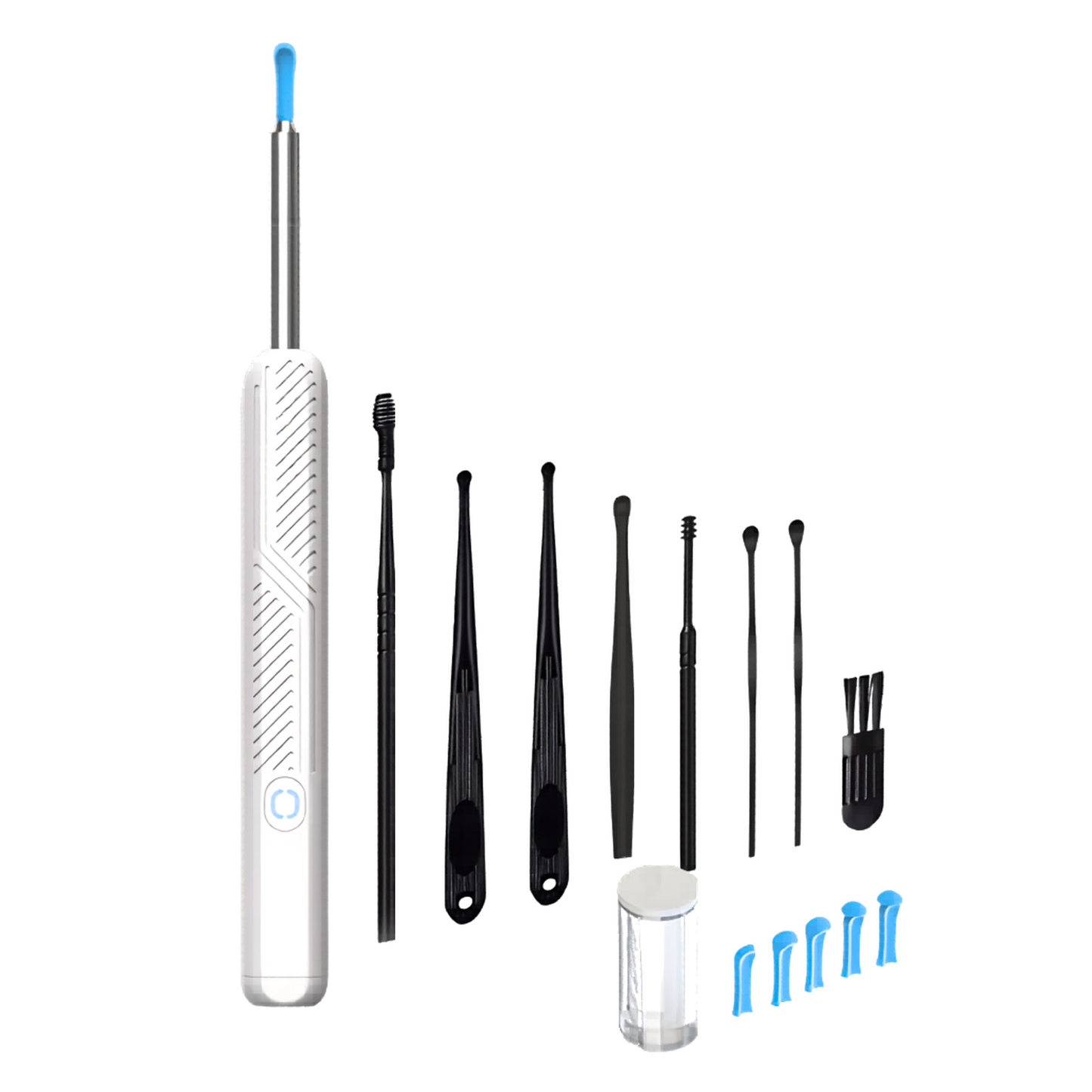
- HD camera with LED lighting for clear visibility
- Soft silicone tips for gentle, skin-safe cleaning
- Wireless connectivity with iOS and Android devices
- Rechargeable battery for convenient use
- Ergonomic design for stability and control
How to Use
How to Use
- Charge the device fully before first use
- Connect to your smartphone via the app
- Attach a silicone tip securely
- Gently clean the outer ear using live view
- Clean the tip after use and store properly
App Setup & Device Connection
App Setup & Device Connection
Follow the steps below to connect your Auralis™ UltraCleanse device to your smartphone.
1. Download the App
Search for EarVision by LineReviewer on the App Store or Google Play and install it on your device.
2. Power On the Device
Press and hold the power button until the indicator light turns on.
3. Connect to Device WiFi
Open your phone’s WiFi settings and connect to the network shown by the device (e.g., EarVision_XXXX).
4. Open the App
Launch the EarVision app to access the live camera view.
5. Start Using the Device
Once connected, you can view real-time footage and begin cleaning with full visibility.
Connection Tips
- Keep the device close to your phone during use
- If connection fails, restart the device and reconnect
- Ensure the app has permission to access WiFi and camera
Safety & Care
Safety & Care
- For external ear use only
- Do not insert deeply into the ear canal
- Stop use if discomfort occurs
- Do not use during infections or irritation
- Clean tips after each use
- Keep out of reach of children
User Manual & Safety Guide
User Manual & Safety Guide
Access the full instructions, safety guidance, and detailed usage information below.
FREQUENTLY ASKED QUESTIONS
FAQS
How do I clean the device after use?
How do I clean the device after use?
Remove the silicone tip and clean it with water. Use the included brush to remove residue. Wipe the device with a dry or slightly damp cloth.
Can multiple people use the device?
Can multiple people use the device?
Yes, but it’s recommended to use separate silicone tips for hygiene purposes.
How often should I use it?
How often should I use it?
Use as needed. For most people, occasional cleaning is sufficient—overuse is not necessary, if you find yourself needing to use it everyday it is recommended to go get your ear checked out by a doctor.
Do I need WiFi to use it?
Do I need WiFi to use it?
No external WiFi is needed. The device creates its own local WiFi connection that your phone connects to.